IOS瀑布流通过UICollectionView控件实现
有些IOS项目会用的瀑布流功能,我们可以选择使用第三方库,也可以自己写一个,如果自己写此功能,可以使用UICollectionView控件进行展示,设置分为几列等。具体代码如下:#define screenHeight [[UIScreen mainScreen]bounds].size.height //屏幕高度#define screenWidth [[UIScreen mainSc
·
有些IOS项目会用的瀑布流功能,我们可以选择使用第三方库,也可以自己写一个,如果自己写此功能,可以使用UICollectionView控件进行展示,设置分为几列等。
具体代码如下:
#define screenHeight [[UIScreen mainScreen]bounds].size.height //屏幕高度
#define screenWidth [[UIScreen mainScreen]bounds].size.width   //屏幕宽度
#define colletionCell 3  //设置具体几列
@interface HomeViewController (){
    UICollectionView *collectionView;
    NSMutableArray  *hArr; //记录每个cell的高度
}

@end

@implementation HomeViewController
- (void)viewDidLoad {
    [super viewDidLoad];
    hArr = [[NSMutableArray alloc] init];
    UICollectionViewFlowLayout *flowLayout=[[UICollectionViewFlowLayout alloc]init];
    [flowLayout setScrollDirection:UICollectionViewScrollDirectionVertical]; //设置横向还是竖向
    collectionView=[[UICollectionView alloc] initWithFrame:CGRectMake(0, 0, screenWidth ,screenHeight) collectionViewLayout:flowLayout];
    collectionView.dataSource=self;
    collectionView.delegate=self;
    [collectionView setBackgroundColor:[UIColor clearColor]];
    [collectionView registerClass:[UICollectionViewCell class] forCellWithReuseIdentifier:@"UICollectionViewCell"];
    [self.view addSubview:collectionView];
}
#pragma mark -- UICollectionViewDataSource

//定义展示的UICollectionViewCell的个数
-(NSInteger)collectionView:(UICollectionView *)collectionView numberOfItemsInSection:(NSInteger)section
{
    return 20;
}

//定义展示的Section的个数
-(NSInteger)numberOfSectionsInCollectionView:(UICollectionView *)collectionView
{
    return 1;
}

//每个UICollectionView展示的内容
-(UICollectionViewCell *)collectionView:(UICollectionView *)collectionView cellForItemAtIndexPath:(NSIndexPath *)indexPath
{
    static NSString * CellIdentifier = @"UICollectionViewCell";
    UICollectionViewCell * cell = [collectionView dequeueReusableCellWithReuseIdentifier:CellIdentifier forIndexPath:indexPath];

    cell.backgroundColor = [UIColor colorWithRed:((10 * indexPath.row) / 255.0) green:((20 * indexPath.row)/255.0) blue:((30 * indexPath.row)/255.0) alpha:1.0f];
    UILabel *label = [[UILabel alloc] initWithFrame:CGRectMake(0, 0, 20, 20)];
    label.textColor = [UIColor redColor];
    label.text = [NSString stringWithFormat:@"%d",indexPath.row];
    //移除cell
    for (id subView in cell.contentView.subviews) {
        [subView removeFromSuperview];
    }
    NSInteger remainder=indexPath.row%colletionCell;
    NSInteger currentRow=indexPath.row/colletionCell;
    CGFloat   currentHeight=[hArr[indexPath.row] floatValue];

    CGFloat positonX=(screenWidth/colletionCell-8)*remainder+5*(remainder+1);
    CGFloat positionY=(currentRow+1)*5;
    for (NSInteger i=0; i<currentRow; i++) {
        NSInteger position=remainder+i*colletionCell;
        positionY+=[hArr[position] floatValue];
    }
    cell.frame = CGRectMake(positonX, positionY,screenWidth/colletionCell-8,currentHeight) ;//重新定义cell位置、宽高

    [cell.contentView addSubview:label];
    return cell;
}

#pragma mark --UICollectionViewDelegateFlowLayout

//定义每个Item 的大小
- (CGSize)collectionView:(UICollectionView *)collectionView layout:(UICollectionViewLayout*)collectionViewLayout sizeForItemAtIndexPath:(NSIndexPath *)indexPath
{
    CGFloat height=100+(arc4random()%120);
    [hArr addObject:[NSString stringWithFormat:@"%f",height]];
    return  CGSizeMake(screenWidth/colletionCell-8, height);  //设置cell宽高
}

//定义每个UICollectionView 的 margin
-(UIEdgeInsets)collectionView:(UICollectionView *)collectionView layout:(UICollectionViewLayout *)collectionViewLayout insetForSectionAtIndex:(NSInteger)section
{
    return UIEdgeInsetsMake(0,0, 0, 0);
}

#pragma mark --UICollectionViewDelegate

//UICollectionView被选中时调用的方法
-(void)collectionView:(UICollectionView *)collectionView didSelectItemAtIndexPath:(NSIndexPath *)indexPath
{
    UICollectionViewCell * cell = (UICollectionViewCell *)[collectionView cellForItemAtIndexPath:indexPath];
    cell.backgroundColor = [UIColor greenColor];
}

//返回这个UICollectionView是否可以被选择
-(BOOL)collectionView:(UICollectionView *)collectionView shouldSelectItemAtIndexPath:(NSIndexPath *)indexPath
{
    return YES;
}


@end
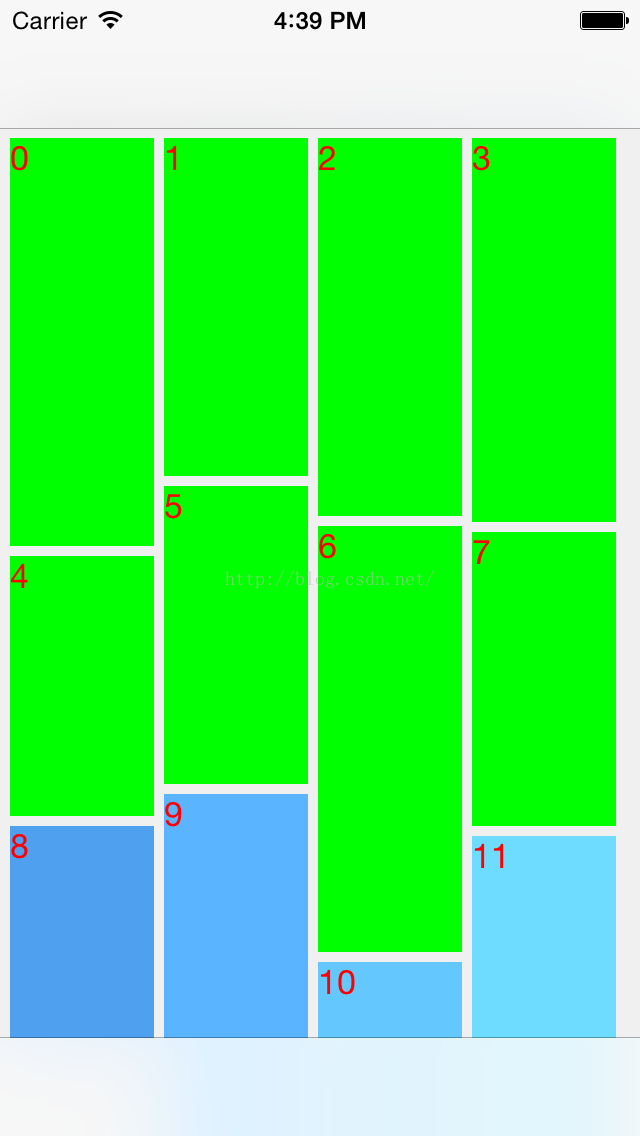
实现结果:

一站式虚拟内容创作平台,激发创意,赋能创作,进入R空间,遇见同道,让优质作品闪耀发光。
更多推荐

 3
3 0
0- 0


 已为社区贡献4条内容

所有评论(0)